01 / BEFORE ACCEPTING
Quote the actual workload
Count editing, admin, exports, feedback time, costs and fees. The full tool calculates a modeled quote floor from your own hourly target.
A fixed-price edit can pay less with every extra hour. Check the impact before you say yes to another revision.
Use your own numbers in this free demo. Then explore the full tool for quoting, revision tracking and extra-work approvals.
No email gate. No account. Inputs are calculated in your browser and are not sent to us.
Not “how many rounds?” alone. You’re checking whether the time inside those rounds still fits the pay you need.
USD illustration loaded. Replace the fictional amounts with yours. This demo uses USD only.
Planned time should include editing, admin, exports and already-budgeted revisions. “Extra” means time beyond that plan. Fees and cash costs are deducted; taxes and omitted costs are excluded. Results are estimates.
Count editing, admin, exports, feedback time, costs and fees. The full tool calculates a modeled quote floor from your own hourly target.
Record included changes, proposed new work and corrections separately. Compare included feedback with the allowance you agreed.
Draft the new scope, fee and timing. Review it, then ask your client to approve before you start. A logged request is not permission to charge.
A standalone desktop tool plus communication drafts. Enter your estimates, log the real work, and keep the next client conversation specific.
One-time downloadable product. Desktop Chromium tested; native Safari and mobile local-file execution unverified. No subscription or AI API is needed by the tool. Checkout and delivery happen on Payhip.
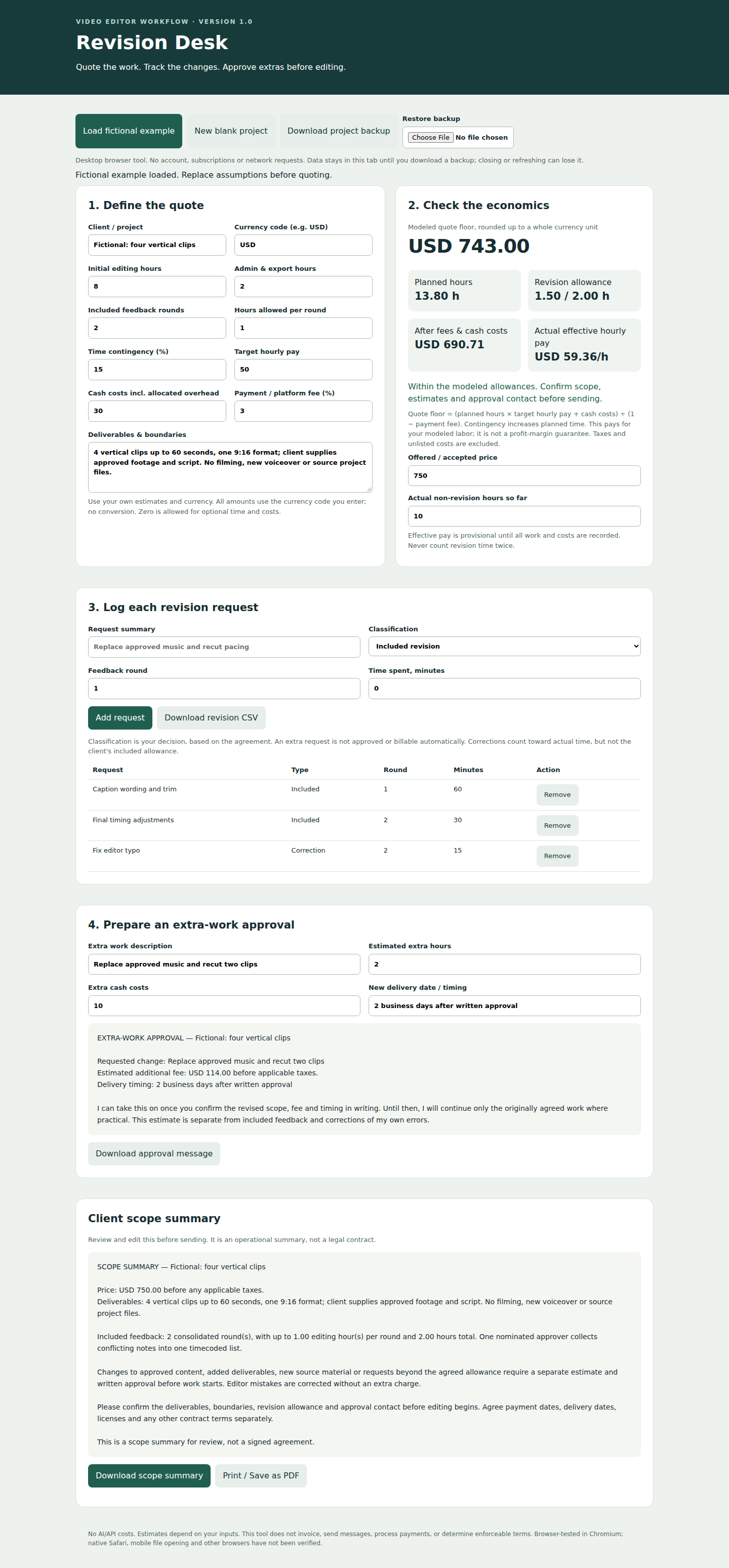
Version 1.0 screenshot under the former Revision Desk name. Version 1.1 is branded ShowWorth Edit Margin; the workflow is unchanged. Fictional example, not customer results.
Generate an editable message that asks for one consolidated, timecoded list.
Use the free message builder →Walk through fees, costs, actual hours and the time that fits your target.
Read the worked example →Calculate a proposed fee and generate an editable request for client approval.
Build an extra-work proposal →Know an editor who takes fixed-price jobs? Share this calculator with them.
Share on Bluesky →Opens a draft for you to review and post.
This page checks one project's extra-time impact. The paid download adds quoting, revision classification, allowance tracking, client drafts, CSV exports and restorable project backups.
No. You supply your assumptions and decide what your agreement includes. Estimates, approval drafts and logs do not create legal obligations or authorize an invoice.
The paid product is designed for desktop browser use. Native mobile file opening has not been verified. This free page is responsive, but that does not establish compatibility for the downloadable tool.
No. It makes your modeled costs and time visible. Your estimates, clients, execution and agreements determine the result. There are no invented savings figures or customer testimonials here.
They stay in this tab. There is no app-level form submission, tracking script, cookie or local-storage save on this page. Hosting infrastructure may maintain normal request logs. Your optional downloaded check is a plain-text file on your device.
See the full tool, its price and compatibility details before deciding whether it fits your workflow.
Explore ShowWorth Edit Margin →Request a custom calculator or spreadsheet fix · Browse all ShowWorth Studio tools
Share this page with someone facing the same decision.
You choose the recipient and review before sending. Sharing uses this page's public link, never your calculator inputs.